
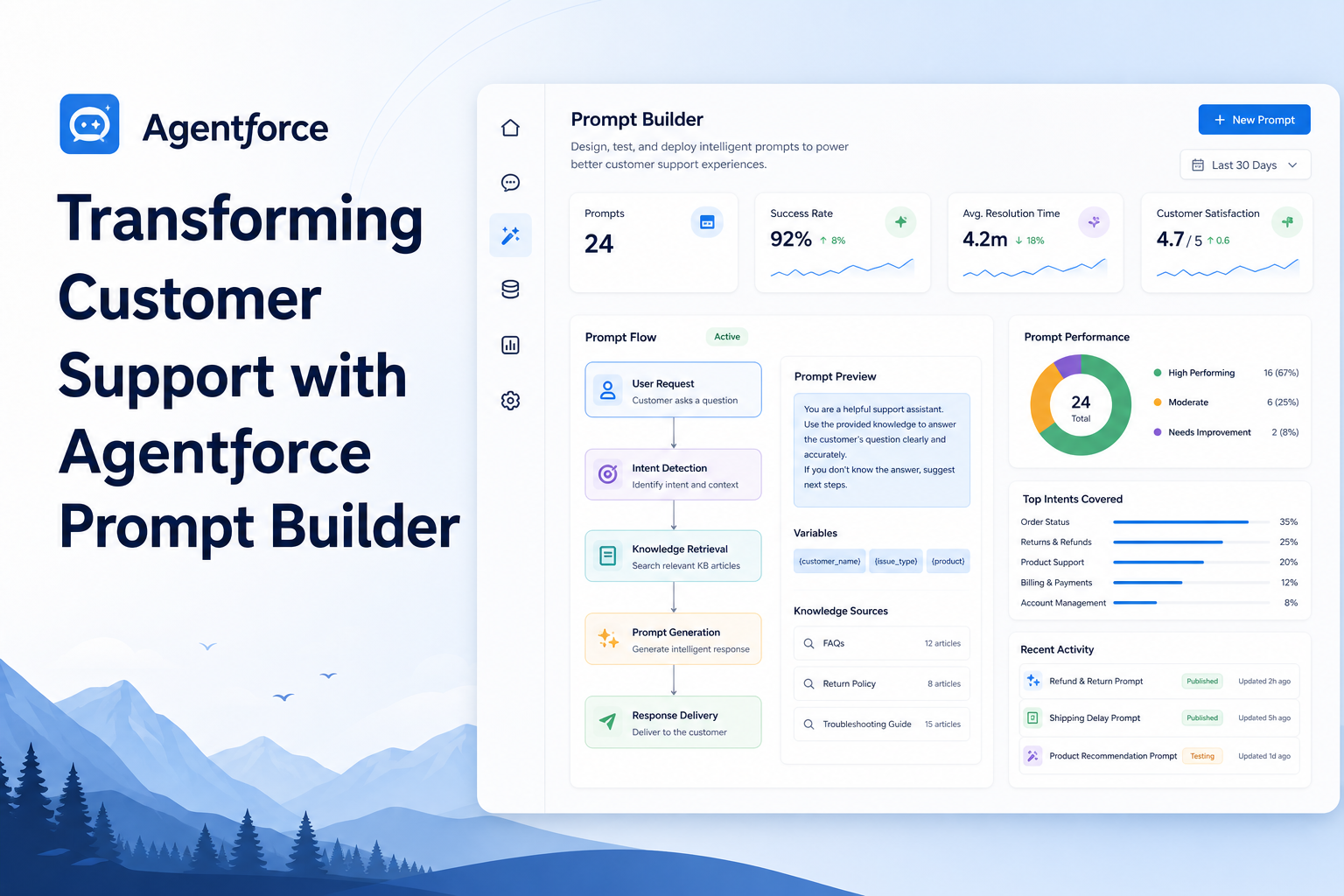
Transforming Customer Support with Agentforce Prompt Builder
Enhance customer support experiences using Agentforce Prompt Builder to create intelligent AI-driven prompts.
Salesforce AI Developer
Abstract
Customer support teams often spend significant time reviewing customer records, understanding issue history, determining priority levels, and deciding the next course of action. As organizations grow, manually analyzing every customer case becomes time-consuming and can lead to inconsistent decision-making. Salesforce Prompt Builder provides a powerful way to leverage Generative AI directly within CRM records. In this implementation, a custom Customer object was created to demonstrate two key Prompt Builder capabilities:
- Record Summary: Automatically generates a concise summary of customer information.
- Field Generation: Automatically generates actionable business insights such as Resolution Plans and AI-based Priority Levels.
This solution helps support teams quickly understand customer situations, prioritize cases, and improve response efficiency without manual analysis.
Solution
Business Challenge
Customer support representatives often need to review multiple fields before understanding a customer's situation:
- Customer information
- Purchase history
- Support status
- Customer feedback
- Reported issues
This process consumes valuable time and may result in inconsistent support decisions.
Proposed Solution
Using Salesforce Prompt Builder, AI automatically analyzes customer records and generates:
- Customer Summary (Record Summary) — Provides a quick overview of the customer profile and support case.
- Resolution Plan (Field Generation) — Provides AI-generated recommendations for resolving the reported issue.
- AI Priority Level (Field Generation) — Automatically classifies support cases as High, Medium, or Low.
This enables support teams to focus on the most critical customers first.
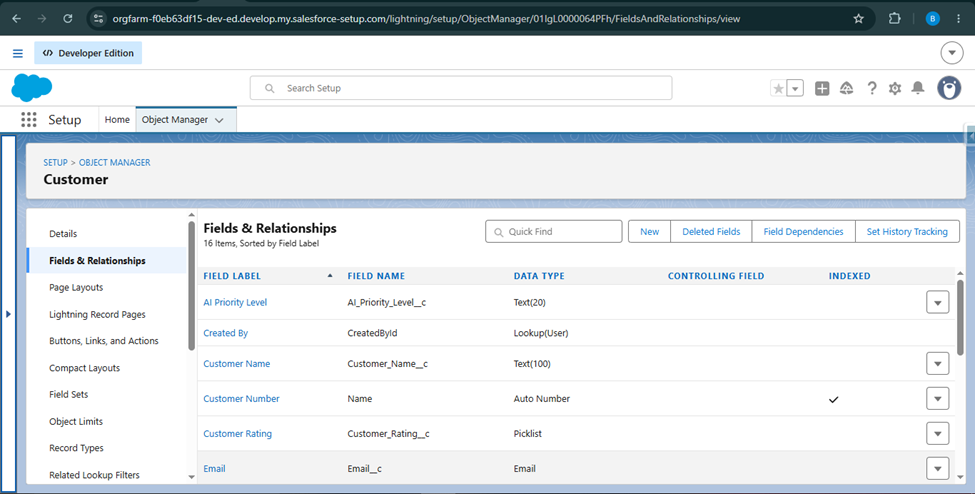
Customer Object Design
The following fields were created in the custom Customer object:
| Field Name | Type |
|---|---|
| Customer Name | Text |
| Product Purchased | Text |
| Purchase Amount | Currency |
| Total Orders | Number |
| Customer Rating | Picklist |
| Support Status | Picklist |
| Last Interaction Date | Date |
| Notes | Long Text Area |
| Resolution Plan | Long Text Area |
| AI Priority Level | Text |
Step-by-Step Guide
Step 1: Create the Customer Object
Create a custom object named Customer. Add all customer-related fields required for support analysis.
Step 2: Create Sample Customer Records
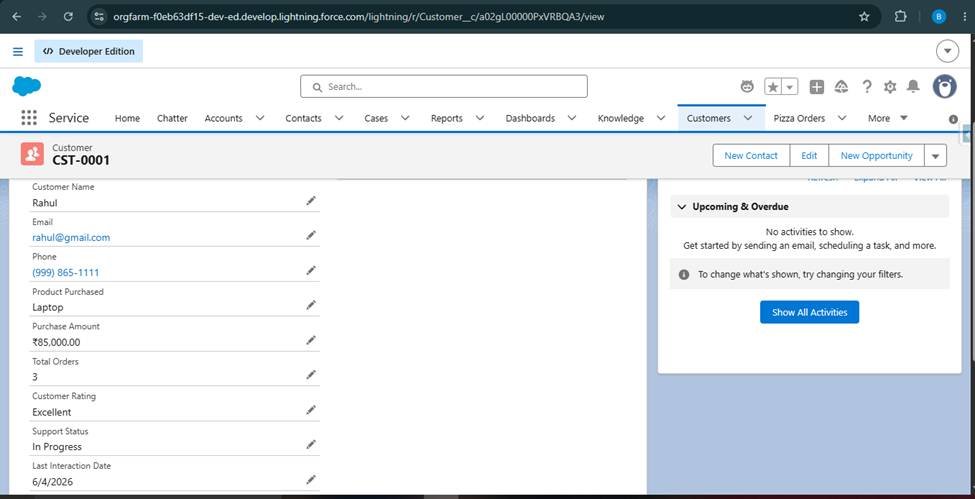
Example Record:
| Field | Value |
|---|---|
| Customer Name | Rahul |
| Product Purchased | Laptop |
| Purchase Amount | 85000 |
| Total Orders | 5 |
| Customer Rating | Excellent |
| Support Status | In Progress |
| Notes | Customer reported battery issue and requested replacement. |
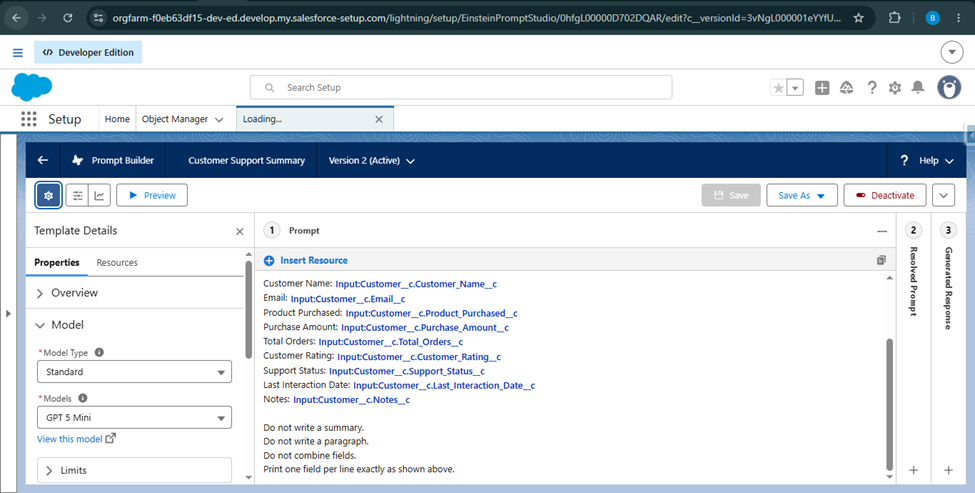
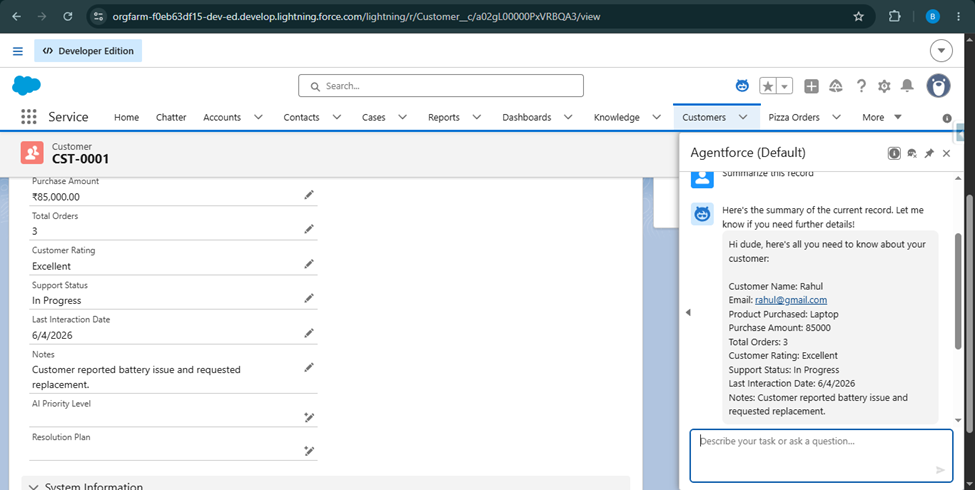
Step 3: Create a Record Summary Prompt Template
Navigate to: Setup → Prompt Builder
Create a new template: Template Type → Record Summary
Purpose: Generate a concise overview of the customer profile and support situation.
Example Output: "Customer Rahul is a high-value customer who purchased a laptop worth ₹85,000. The customer reported a battery issue and requested a replacement. The support case is currently in progress and requires attention from the support team."
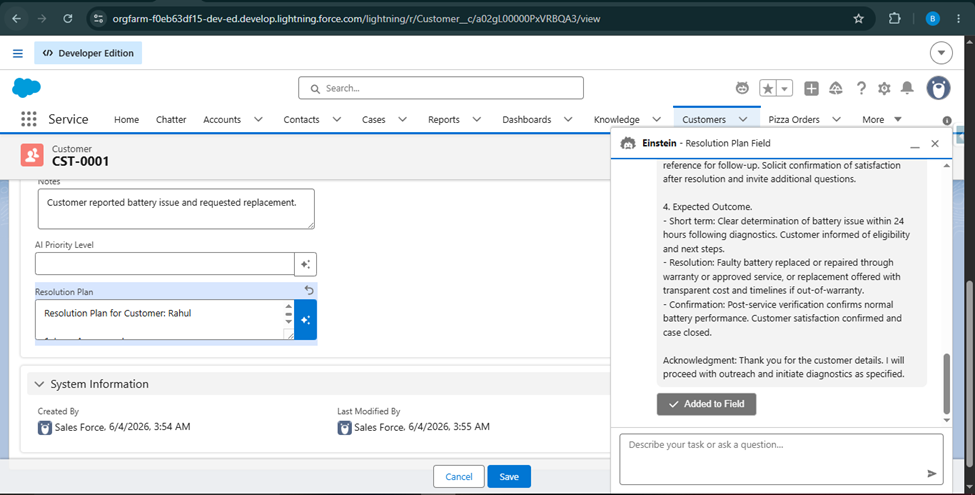
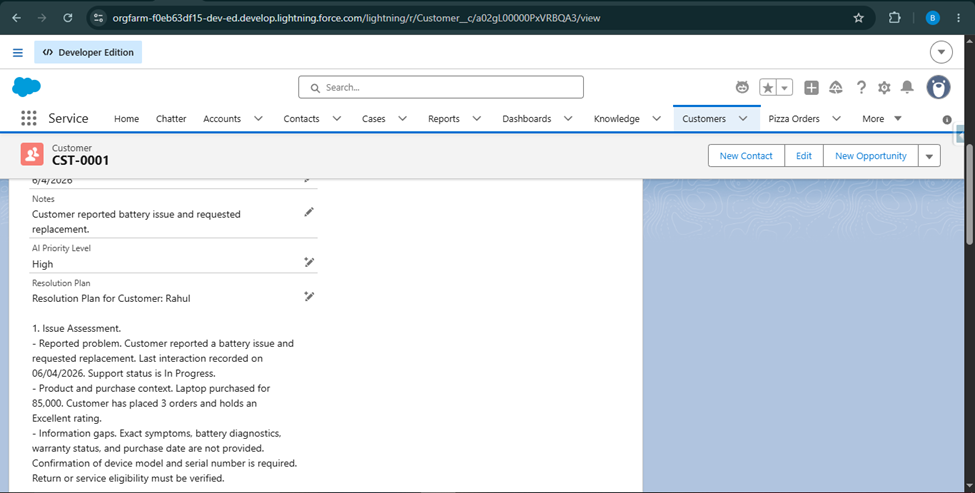
Step 4: Create Resolution Plan Field
Create a new field:
- Field Name → Resolution Plan
- Data Type → Long Text Area
Step 5: Create Field Generation Prompt
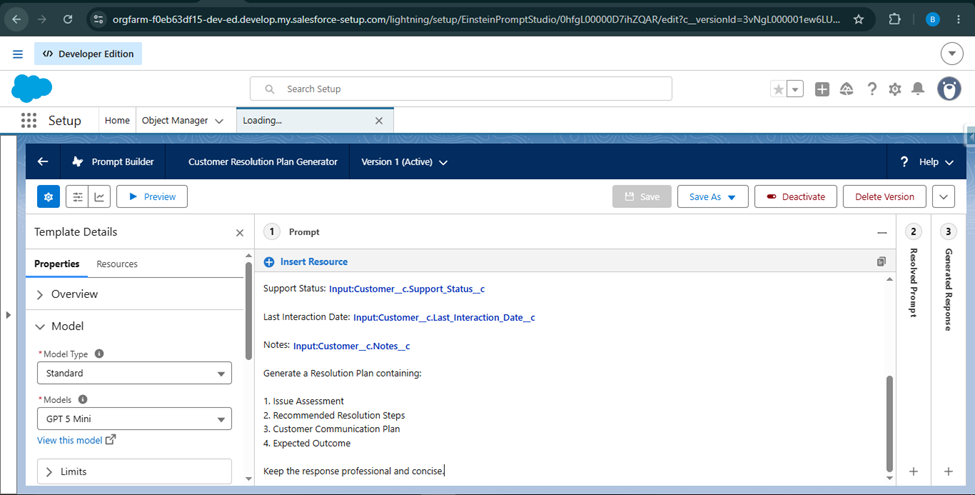
Create a new Prompt Builder template.
- Template Type → Field Generation
- Target Field → Resolution Plan
Purpose: Generate recommended actions for resolving the customer's issue.
Example Output:
- Issue Assessment: A customer reported a battery issue with the purchased laptop.
- Recommended Resolution Steps: Verify the battery defect, validate warranty eligibility, and initiate the replacement process.
- Communication Plan: Provide regular updates regarding the replacement process.
- Expected Outcome: Successful issue resolution and improved customer satisfaction.
Step 6: Create AI Priority Level Field
Create another field:
- Field Name → AI Priority Level
- Data Type → Text
Step 7: Create AI Priority Field Generation Prompt
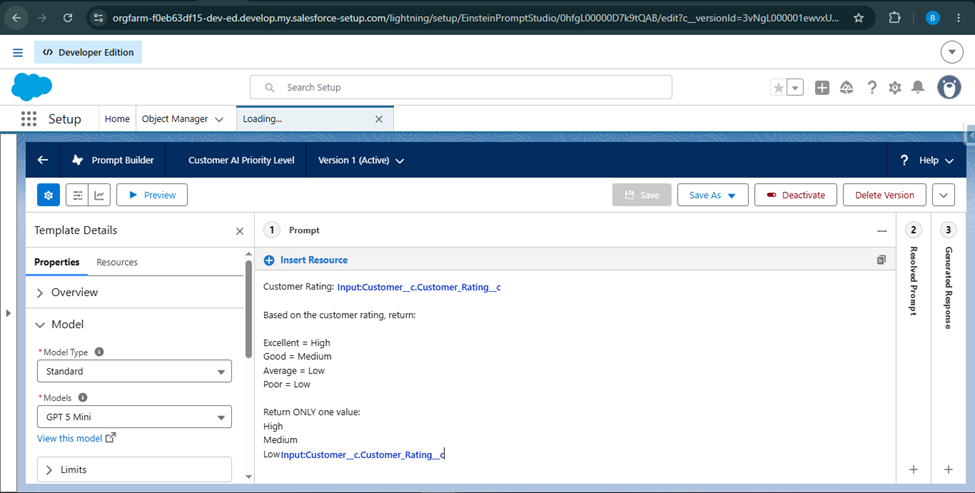
- Template Type → Field Generation
- Target Field → AI Priority Level
Purpose: Automatically determine support priority.
Sample Logic:
| Customer Rating | Priority |
|---|---|
| Excellent Customer | High |
| Good Customer | Medium |
| Average/Poor Customer | Low |
Example Output: High
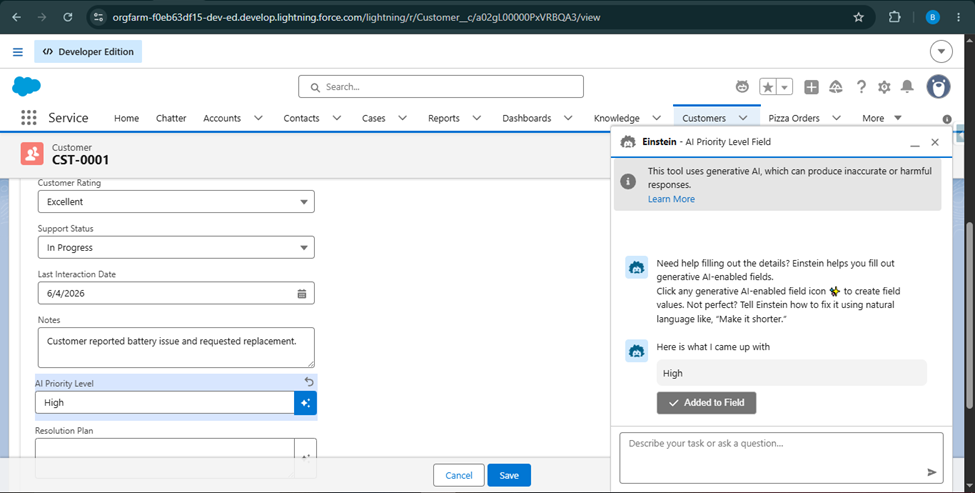
Step 8: Test the Solution
Open a Customer record and execute:
- Generate Summary
- Generate Resolution Plan
- Generate AI Priority Level
Verify that all AI-generated outputs are populated successfully.
Business Benefits
- Faster Customer Analysis: Support agents no longer need to review multiple fields manually.
- Improved Productivity: AI-generated summaries significantly reduce analysis time.
- Consistent Decision Making: Every support case is evaluated using the same logic and criteria.
- Better Customer Experience: High-priority customers can be identified and assisted faster.
- Increased Agent Efficiency: Support teams can focus on resolving issues instead of collecting information.
Conclusion
Salesforce Prompt Builder enables organizations to transform traditional CRM records into intelligent, AI-powered business assets. By combining Record Summary and Field Generation capabilities, customer support teams can quickly understand customer situations, generate recommended actions, and prioritize cases automatically.
Advantages
- Easy to implement
- No custom code required
- Improves support productivity
- Reduces manual analysis
- Enhances customer experience
- Demonstrates practical AI adoption within Salesforce
Limitations
- Output quality depends on prompt design
- Requires proper field configuration
- AI recommendations should be reviewed for complex business scenarios
Overall, this solution demonstrates how Salesforce Prompt Builder can be used to deliver meaningful business value through AI-driven customer support automation.