
Building an Async Process Queue (APQ) Framework in Salesforce
Design a scalable asynchronous processing framework in Salesforce for handling large-volume background operations.
Salesforce Developer
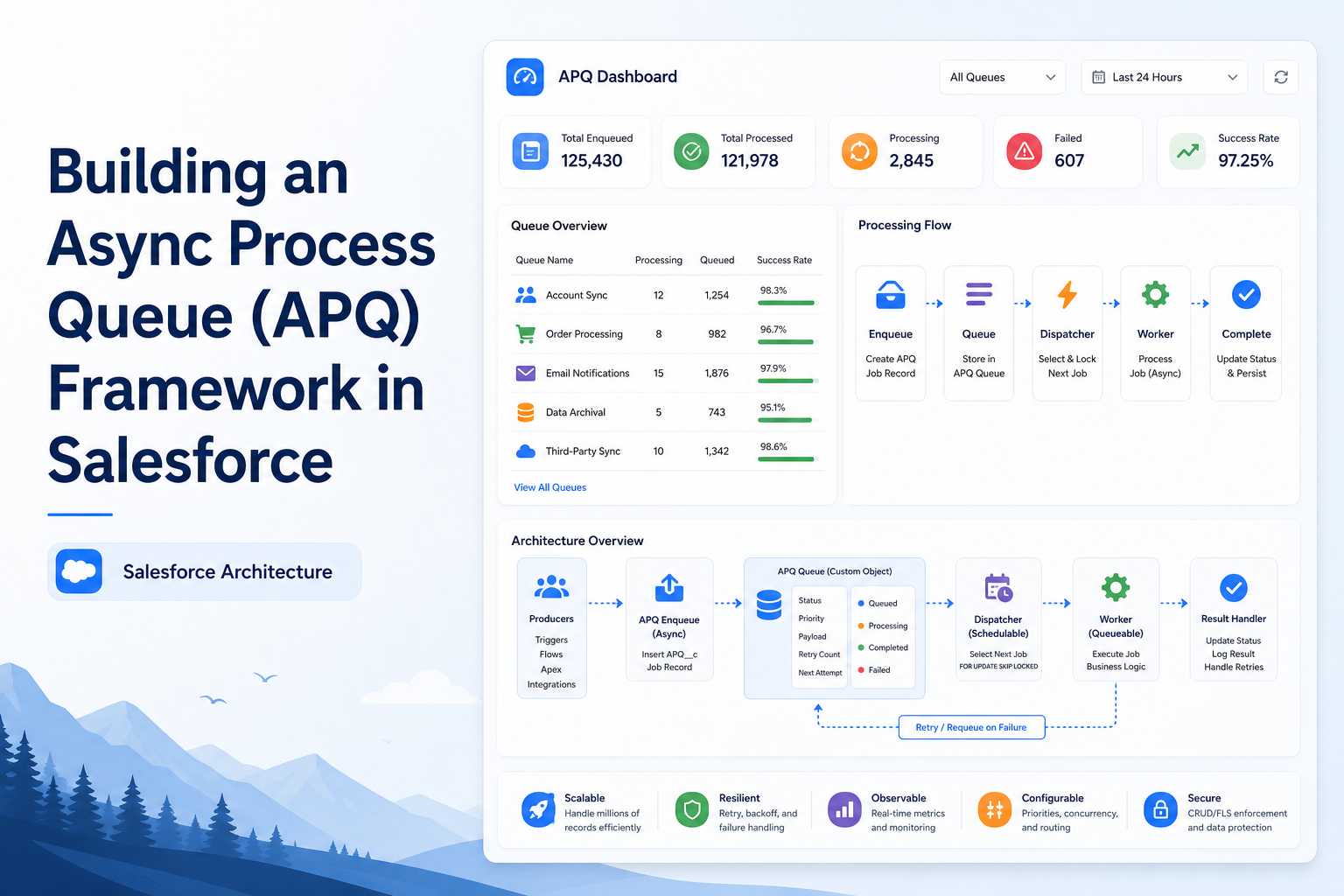
Abstract
Enterprise Salesforce applications often require asynchronous processing to handle large data operations, integrations, and long-running business logic efficiently. This document demonstrates the implementation of an Async Process Queue (APQ) Framework using Apex, triggers, and queue-based processing architecture. The framework enables scalable and reusable asynchronous execution, improves performance, reduces trigger execution time, and helps avoid governor limit issues in Salesforce applications.
Introduction
Salesforce governor limits restrict the amount of processing that can occur during synchronous transactions. In enterprise projects, executing heavy business logic directly within triggers or synchronous operations may lead to:
- CPU timeout exceptions
- SOQL limit violations
- DML limit issues
- Long transaction execution times
- Poor application performance
To overcome these limitations, asynchronous processing frameworks are commonly implemented.
The Async Process Queue (APQ) Framework provides a scalable architecture that:
- Queues processing requests
- Executes operations asynchronously
- Dynamically invokes handler classes
- Supports retry and error handling
- Improves transaction performance
This framework is especially useful for:
- External integrations
- Bulk data processing
- API callouts
- Long-running business operations
- Notification processing
- Enterprise workflow automation
Objectives
The primary objectives of this implementation are:
- Build a reusable asynchronous processing framework
- Reduce synchronous trigger processing
- Support scalable enterprise processing
- Dynamically execute business handlers
- Improve application performance
- Avoid Salesforce governor limits
- Enable configurable queue-based execution
- Centralize asynchronous processing logic
Solution Architecture
Process Flow
Business Trigger/Event
        ↓
    Handler Class
        ↓
Create Async Process Queue Record
        ↓
Async Process Queue Trigger
        ↓
Async Process Queue Handler
        ↓
Dynamic Handler Invocation
        ↓
Asynchronous Business Processing
        ↓
   Update Queue Status
Async Process Queue Object Structure
Custom Object: Async_Process_Queue__c
This custom object stores asynchronous process requests.
Recommended Fields:
| Field Name | Type | Purpose |
|---|---|---|
| Name | Auto Number | Queue record identifier |
| Process_Class__c | Text | Handler class name |
| Record_Id__c | Lookup/Text | Target business record |
| Status__c | Picklist | Queue processing status |
| Request_JSON__c | Long Text | Request payload |
| Response_Message__c | Long Text | Processing response |
| Retry_Count__c | Number | Retry tracking |
| Is_Processed__c | Checkbox | Processing flag |
Step-by-Step Implementation
Step 1 — Create Async Process Queue Object
Create custom object: Async_Process_Queue__c
Add the required fields for:
- Process tracking
- Status monitoring
- Request payload storage
- Response logging
Purpose: The queue object acts as the centralized storage for all asynchronous processing requests.
Step 2 — Create AsyncProcessHandler Interface
Create an Apex interface:
public interface AsyncProcessHandler {
    void processRecord(Id recordId);
}
Purpose: This interface standardizes asynchronous handler implementations and ensures all processing classes follow a common execution structure.
Step 3 — Create AsyncProcessQueueHandler Class
The AsyncProcessQueueHandler class acts as the central processing engine for the framework.
Responsibilities:
- Read queue records
- Dynamically invoke handler classes
- Execute asynchronous logic
- Update processing status
- Handle exceptions
Dynamic Handler Execution
The framework uses Dynamic Apex:
Type handlerType = Type.forName(className);
AsyncProcessHandler handler =
    (AsyncProcessHandler)handlerType.newInstance();
Purpose: This enables runtime invocation of different business handlers without hardcoding class references.
Step 4 — Create Queue Trigger
Create trigger: AsyncProcessQueueTrigger
Example:
trigger AsyncProcessQueueTrigger
on Async_Process_Queue__c (after insert) {

    AsyncProcessQueueHandler.processQueue(
        Trigger.new
    );
}
Purpose: The trigger automatically initiates asynchronous processing whenever a new queue record is created.
Step 5 — Implement Future Processing
Use Future methods for asynchronous execution.
Example:
@future(callout=true)
public static void processAsync(
    String queueRecordId
) {

}
Purpose: Future methods move processing outside the synchronous transaction and reduce trigger execution time.
Step 6 — Create Business Handler Class
Example: OpportunityHandler
This class contains business-specific logic.
Responsibilities:
- Validate records
- Create queue entries
- Process opportunity business operations
- Handle integration requests
Sample Processing Flow
Opportunity Update
        ↓
  OpportunityHandler
        ↓
  Create APQ Record
        ↓
AsyncProcessQueueTrigger
        ↓
AsyncProcessQueueHandler
        ↓
Dynamic Handler Execution
        ↓
   Async Processing
        ↓
  Update Queue Status
Step 7 — Create Queue Records
Example queue creation:
Async_Process_Queue__c apq =
    new Async_Process_Queue__c();

apq.Process_Class__c =
    'OpportunityHandler';

apq.Record_Id__c =
    opportunityId;

apq.Status__c = 'Pending';

insert apq;
Purpose: Business operations are stored in the queue for asynchronous processing.
Error Handling
The framework supports centralized exception handling.
Example:
try {

    handler.processRecord(recordId);

}
catch(Exception ex) {

    queueRec.Status__c = 'Failed';
    queueRec.Response_Message__c =
        ex.getMessage();

    update queueRec;
}
Supported Error Handling:
- Dynamic class loading failures
- Governor limit exceptions
- API failures
- Validation exceptions
- DML failures
- Null pointer exceptions
Real-Time Business Use Cases
The APQ framework can be used for:
- External system integrations
- Order processing
- Notification processing
- API callouts
- Bulk data synchronization
- Document generation
- Approval processing
- Payment processing
- Data migration activities
Best Practices
Recommended implementation guidelines:
- Keep triggers lightweight
- Use queue records for large operations
- Separate business logic into handlers
- Centralize exception handling
- Monitor failed queue records
- Avoid recursive processing
- Use bulkified operations
Conclusion
The Async Process Queue (APQ) Framework provides a scalable and reusable asynchronous processing architecture for Salesforce enterprise applications. The framework supports dynamic execution patterns and can be extended further to support enterprise-grade asynchronous architectures.
This implementation is highly beneficial for large-scale Salesforce applications requiring reliable and scalable asynchronous business processing.
References
- Salesforce Async Apex Documentation
- Salesforce Asynchronous Apex Documentation