
Access Professional Management
Learn how to effectively manage access permissions for Salesforce users and profiles.
Salesforce Administrator
Objective
The purpose of this solution is to automate user provisioning in Salesforce using Custom Metadata. Instead of manually assigning Roles, Permission Sets, and Public Groups whenever a user is created or their Job Code changes, the system performs these assignments automatically based on predefined metadata configuration.
Business Requirement
Each user belongs to a specific Job Code, and every Job Code has a predefined set of access permissions.
| Job Code | Role | Permission Set | Public Group |
|---|---|---|---|
| 100001 | Sales Manager | Sales_Manager_PS | HR Team |
| 100002 | Finance Manager | Finance_Manager_PS | Finance Team |
When a user is assigned Job Code 100001, they should automatically receive:
- Sales Manager Role
- Sales_Manager_PS Permission Set
- HR Team Public Group
If their Job Code changes to 100002, the system should:
- Update their Role
- Remove the previous Permission Set and Group
- Assign the new Permission Set and Group
Solution Architecture
The solution uses an event-driven architecture.
User Created / Updated
        ↓
   User Trigger
        ↓
Publish Platform Event
 (User_Provisioning_Event__e)
        ↓
 Platform Event Trigger
        ↓
UserProvisioningEventHandler
        ↓
  Read Custom Metadata
        ↓
 Assign / Revoke Access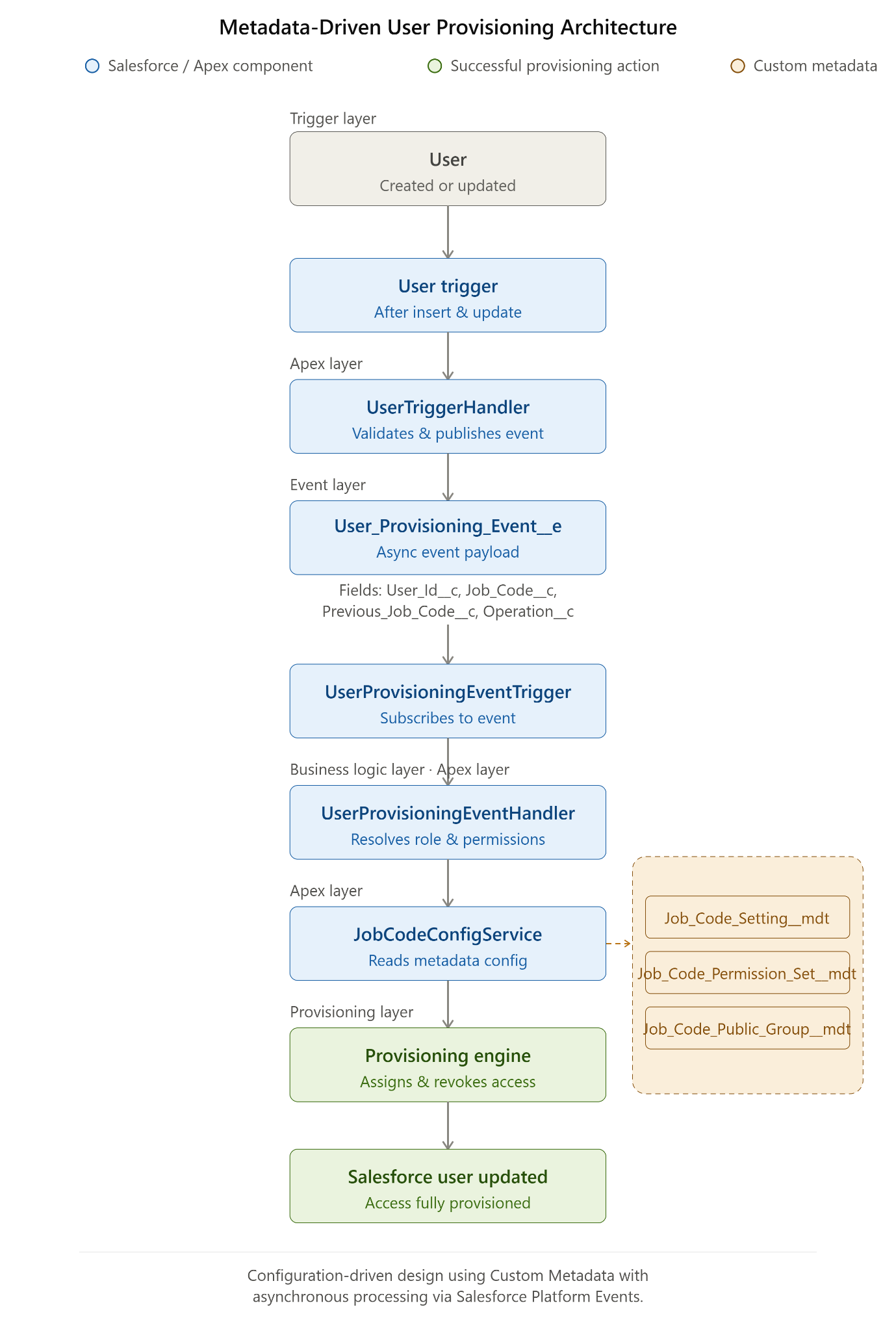
Components Used
1. User Trigger
Executes whenever a User is created or updated.
Responsibilities:
- Detects User creation.
- Detects Job Code changes.
- Publishes a Platform Event.
2. Platform Event — User_Provisioning_Event__e
Contains:
- User Id
- Current Job Code
- Previous Job Code
- Operation (INSERT/UPDATE)
This allows provisioning to happen asynchronously.
3. UserProvisioningEventHandler
Main business logic. Responsibilities:
- Read Job Code configuration.
- Determine Role.
- Determine Permission Sets.
- Determine Public Groups.
- Assign new access.
- Remove obsolete access.
4. JobCodeConfigService
Responsible for reading Custom Metadata. Instead of hardcoding Roles and Permission Sets, this class dynamically loads configuration from metadata. This makes the solution configurable without changing Apex code.
Custom Metadata
Three Custom Metadata Types are used.
| Metadata Type | Purpose | Note |
|---|---|---|
| Job_Code_Setting__mdt | Stores Job Code → User Role mapping. Example: 100001 → Sales Manager | One role per Job Code |
| Job_Code_Permission_Set__mdt | Stores Job Code → Permission Sets mapping | One Job Code can have multiple Permission Sets |
| Job_Code_Public_Group__mdt | Stores Job Code → Public Groups mapping | One Job Code can belong to multiple Public Groups |
Process Explanation
Create Process
When a User is created:
User Created
      ↓
Trigger fires
      ↓
Platform Event published
      ↓
Configuration loaded
      ↓
Role assigned
      ↓
Permission Sets assigned
      ↓
Public Groups assigned
Update Flow
When Job Code changes:
Old Job Code
      ↓
Previous configuration loaded
      ↓
New Job Code
      ↓
New configuration loaded
      ↓
Remove old Permission Sets
Remove old Public Groups
Update Role
Assign new Permission Sets
Assign new Public Groups
This ensures the user always has the correct access.
Why Platform Events?
Platform Events were chosen because they:
- Execute asynchronously.
- Reduce User save transaction time.
- Improve scalability.
- Separate provisioning logic from the User Trigger.
- Support bulk processing.
Bulkification
The solution follows Salesforce best practices:
- No SOQL inside loops.
- No DML inside loops.
- Uses Sets and Maps.
- Processes multiple users in a single transaction.
- Uses
Database.insert/update/delete(..., false)for partial success.